Syllabbles Review: I Really Wanted to Love This Tool (But the eBook Stage Broke the Workflow)

Happy Wednesday or whatever day of the week it is for you. Here is the honest thing: I was genuinely excited about Syllabbles.
The promise is simple and very appealing if you run a small business or a small nonprofit: take your content and turn it into multiple formats such as eBooks, flipbooks, audiobooks, podcasts, and even support design. In other words, one piece of content, many repurposed assets.
That is exactly the kind of workflow that helps organizations scale output without scaling headcount.
And I had a perfect use case. I wrote a book that is available in hard copy on Amazon (here is my Amazon affiliate link to my paperback book: https://amzn.to/4fbd1Ef), but I never converted it into an eBook that I could sell or gift from my website. The bonus I hoped for was an audiobook version.
Then I tested Syllabbles end to end. The flipbook part worked well enough to be useful. The audiobook sounded decent. But the eBook stage had too many issues, including formatting problems and outright failures that derailed the workflow.
This review is for the part of you that wants to know: “Is this ready for real work? Could I confidently use it with my content?” If you are building resilience content, training materials, leadership resources, donor handbooks, or any other knowledge product, you deserve a straight answer.
What Syllabbles Is Trying to Do (And Why That Matters for Small Teams)
Syllabbles is positioned as a content repurposing hub. The workflow I was testing followed a pretty logical chain:
Convert a hard-copy book (uploaded as a document) into an eBook
Convert the eBook into a flipbook you can embed or share
Convert the eBook content into an audiobook
For small businesses and small nonprofits, the appeal is obvious:
You already have expertise and content. You should be able to reuse it.
You do not want to hire someone for formatting, layout, narration scripting, and production across formats.
You want a consistent brand voice across outputs.
From a “creator operations” standpoint, Syllabbles is attractive because it tries to unify the entire pipeline.
Now, here is where it gets real: unified workflows only matter if the earlier steps actually produce usable output.
First, the Setup: Brand Voice and Design
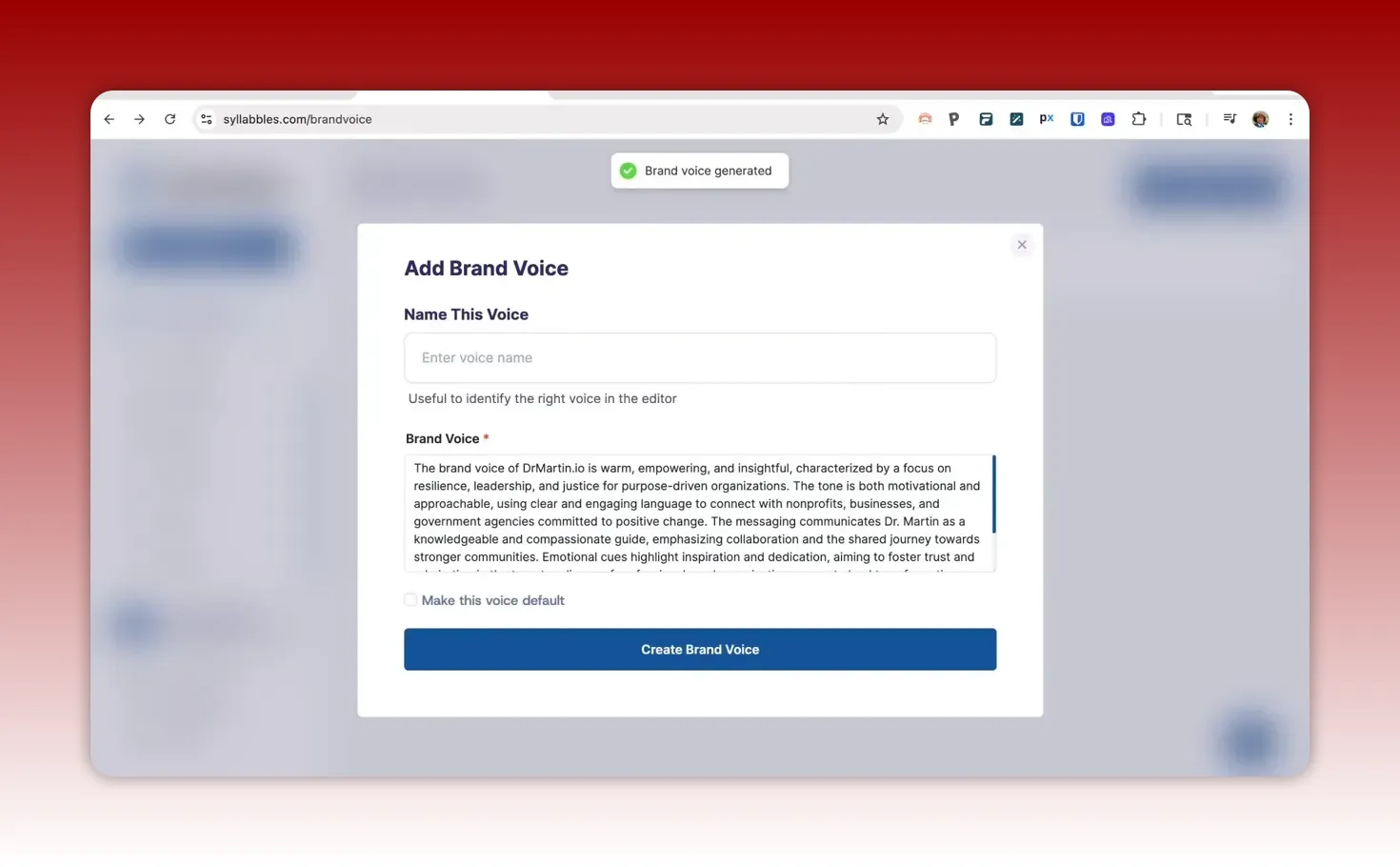
The first feature I tested was Brand Voice. Syllabbles lets you create a brand voice profile and “humanize” content using that voice. It also notes integrations with major LLMs.
To set my brand voice, I pulled from my own website (DrMartin.io) and generated a brand voice description. The resulting summary landed in a consistent tone: warm, empowering, insightful, and conversational but still authoritative. It also emphasized resilience, leadership, and justice for purpose-driven organizations.
After setting that as the default, I had a brand voice to reuse across creation steps.
From a user experience standpoint, this part felt normal and expected. You define voice, then you generate content or format documents using it.
So far, so good. The problem would show up later, when I tried to convert a real book file into an eBook.
Ebook Conversion: Where the Workflow Started to Fray
I began with an existing book (titled We Are the Question and the Answer) and uploaded it to create an eBook.
There were several approaches available in the tool:
Start manual: attempt to bring content in without AI regeneration
Regenerate with AI: use AI assistance and “humanize” content using the selected brand voice
Upload format options: the behavior differed depending on whether I used PDF or Word documents
The first attempt (manual with a document that was effectively treated like a PDF-like upload) was very fast. But speed did not equal usability.
Attempt 1: Upload PDF-like Content, Start Manual
Immediately, there were visible formatting issues:
The cover formatting looked off.
The conversion did not pull content the way it should have.
The tool seemed to treat parts of the book structure incorrectly, including imprint and chapter behavior.
More importantly, the conversion did not preserve the content structure correctly.
Instead of clean chapter segmentation, it treated the imprint page as “chapter one,” and it combined the dedication with the beginning of the table of contents into one page.
Then I checked the actual content area:
Page numbering was messed up.
Pagination and breaks were inconsistent.
If you are converting a book you plan to sell or gift, you cannot “patch it later” indefinitely. Formatting is part of professionalism. For nonprofits, it is also part of credibility.
Yes, the tool suggested that the design is customizable. But the effort required at this stage would be substantial.
At that point, I knew the eBook output would need a lot of manual one-off formatting to make it presentable.
Attempt 2: Use Word Document, Start Manual Again
So I tried again. This time, I used what I hoped would be a more conversion-friendly file: a Word document.
Manual formatting improved some areas. The overall formatting was better than the earlier PDF upload.
But the sources and reading structure still had problems:
The sources looked rough and blended into the next chapter.
It did not handle reading pagination cleanly across uploaded documents.
In other words, the conversion was “closer,” but not clean enough to be ready for a productized eBook.
If your team is small, “closer” can still be a deal-breaker. There is a big difference between:
“I can make a few cosmetic edits quickly”
and “I have to spend hours reformatting structural elements across many pages”
Attempt 3: AI Regeneration with Humanize (Using a Model Selection)
Next, I tried the AI path. Here is what I used:
AI regeneration enabled
Brand voice selected (the profile I generated earlier)
Humanize content enabled
A model selection feature that allows choosing an LLM
At the time of testing, the tool did not include the latest model lineup I expected. I selected Claude Sonnet 4.5 as the model of choice for this test.
I started a timer to see how long AI regeneration took.
After about 10 minutes, an error message popped up. It disappeared too quickly to read it, and effectively, the process resulted in nothing. No usable regeneration output.
And because I was testing credits and creation counts, I also had a concern: did this attempt consume credits even though it failed?
In the end, this attempt felt like a failure in execution, not a simple formatting inconvenience.
The Hidden Problem: Manual Editing Could Trigger Destructive Changes
When AI regeneration failed, I went back to the Word document inside the tool to salvage what could be salvaged.
One thing I noticed: the tool provided controls to manage chapter structure, including the ability to move sections around.
That sounds helpful. But I ran into a dangerous edge case while trying to remove “chapter one” after a structural mistake.
I used the delete control. By clicking that button, it removed the chapter setup in a way that did not just remove one segment. It dramatically reduced content. In the new output, it generated essentially one chapter that was only a few sentences long.
So instead of “formatting fix,” it turned into a bigger loss.
I also saw signs like M dashes in the content, which is a small thing but it can be a big formatting headache across a book.
And beyond the content itself, there is another issue that matters for layout: the tool did not show grid snapping or helpful centering and spacing guides. That makes it difficult to ensure consistent spacing between paragraphs, headings, and body text.
Ultimately, this section of the process made it clear: the eBook pipeline needed more stability and quality controls before it can be trusted for real book conversion.
In fact, when I checked whether the imported pages were still present, they were permanently lost. That meant re-importing content pages would be required to continue testing.
For small teams, that is a non-starter. You cannot run a workflow where a failed attempt can permanently wipe content.
So What Actually Worked? Flipbooks
After all the eBook conversion drama, I tested the next stage: convert to flipbook.
This part was much more straightforward. And I picked a shorter version at first, which made it easier to iterate quickly.
The flipbook generated and looked fairly decent, even if it is “basic.”
Flipbook Design and Page Flip Effects
The flipbook included:
Different page flip effects
Cover flow and viewer options
Visually, there was a slightly different look depending on the flip effect style. One slider option seemed to show a more noticeable difference, where pages before and after the primary page appear angled.
However, none of the differences made it feel like it was built for reading an entire book comfortably. This looked better suited for:
Quick reports
Teaser content
Embeddable marketing or landing page assets
Sharing and Embedding Limitations
Syllabbles offered a share link, but embedding into a website was not as smooth as I hoped.
There is an iframe workaround you could try, but in practice, it did not seem reliable.
For a small business or nonprofit, this matters because your website is typically where your assets live. If you cannot embed a flipbook cleanly, the “repurpose it everywhere” promise loses value.
Still, compared with the eBook stage, the flipbook conversion itself was a clear win.
Audiobook Conversion: Not Perfect, But Usable for Some Cases
Then I tested the audiobook conversion.
The audiobook stage offered voices and allowed some basic controls such as speed. It also seemed to run faster when the content was shorter.
For the shorter version, the audiobook generation took about a minute.
That is a good sign in terms of workflow speed. If you have hundreds of pages, the generation time becomes the bottleneck. But for smaller pieces or excerpts, it can work.
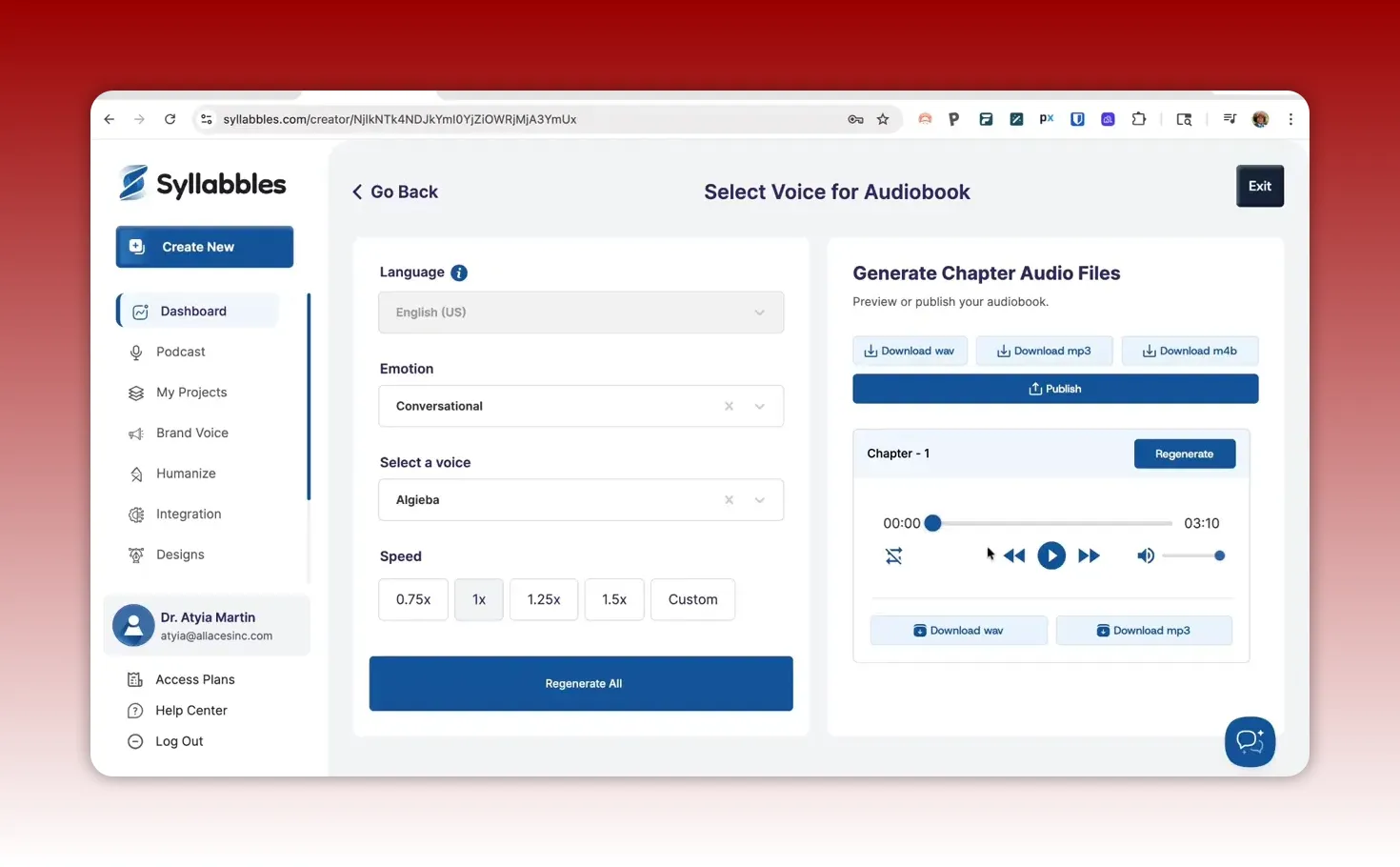
Voice Quality and “Robotic” Feel
When the audiobook played, it was not terrible.
The narration quality included a slightly robotic tone, including what sounded like a “titty” quality in one part (not a deal-breaker, but noticeable). You can likely improve results with editing and formatting, but in my test, it was “good enough if you need an audiobook now.”
So the audiobook stage offered a usable output, even if it might not meet the expectations of someone who wants a premium listening experience. Listen here for your
When the Long Content Fails: The “No Valid Content” Problem
After getting flipbooks and a manageable audiobook sample, I wanted to see if the system could handle the longer content in a way that supports a complete product workflow.
I tried to create an eBook for the longer version using the AI approach again, but that is where things fell apart further.
The system responded with a message indicating there was no valid content available for audio generation.
That was confusing, because this was the long content I had already used earlier in the pipeline. In other words, the tool behaved like it could not find content where content clearly existed.
That kind of mismatch is particularly painful for small teams. You cannot plan your repurposing schedule around a tool that sometimes cannot “see” the input properly.
My Bottom Line: Promising Concept, Execution Not Baked Yet
I want to say this clearly: Syllabbles has an amazing concept.
A unified workflow that turns content into an eBook, then a flipbook, then an audiobook, and potentially even podcasts, is exactly the kind of thing that could help organizations scale outreach.
This is especially relevant for small businesses and small nonprofits, where the bottleneck is often production capacity, not ideas.
But in practice, the tool was not ready for reliable production use, primarily because of issues at the eBook stage.
The eBook conversion had:
Formatting translation problems (especially when using PDF-like uploads)
Incorrect structural behavior (like the imprint becoming chapter one)
Pagination and page number issues
AI regeneration failures and unclear error handling after long waits
Risks of destructive manual editing
Permanent loss concerns with imported pages
Long content that returned “no valid content” for generation
To be fair, tools evolve. This kind of bug list can show up when something is new or still in active development. However, the magnitude of the issues goes beyond minor polish. The workflow simply cannot deliver consistently usable eBooks.
I was disappointed because I truly had a use case that seemed perfect for this tool: converting a hard-copy book available on Amazon (here is my Amazon affiliate link to my paperback book: https://amzn.to/4fbd1Ef) into an eBook that could be offered on my website and used as a gift for clients. I also hoped to include an audiobook bonus for clients.
The flipbooks worked pretty decently. The audiobook for a shorter version was usable. But because the eBook stage did not behave reliably, the end-to-end workflow could not be completed.
What This Means If You Are a Small Business or Small Nonprofit
If you are considering Syllabbles, here is the practical guidance that comes from testing it with a real book conversion workflow.
Use It Only If You Can Tolerate Manual Work
If you are the kind of team that can invest time into formatting cleanup and structural editing, you might still salvage outputs. But that is time your team could spend on:
marketing
program delivery
grant writing and donor communication
service improvements
For most small teams, a repurposing tool needs to reduce workload, not create it.
Consider Starting With Smaller Deliverables
Flipbook and audiobook generation for shorter content seemed to work better.
If you want to repurpose:
a report
a mini guide
a short curriculum module
a landing page asset
Then you may get value from Syllabbles without being blocked by long-form eBook conversion.
Do Not Assume It Will Convert Complex Book Structures Cleanly
Books have tables of contents, imprints, dedications, sources sections, page breaks, and other structural elements.
In my testing, the tool did not reliably preserve that structure, and it struggled with pagination and page breaks.
That means if you are converting an established book (not just a single straightforward document), plan for additional editing or use a different tool for that step.
Have a Backup Plan for File Safety
Because manual editing could remove large content sections and imported pages could become permanently lost, you should treat this as a tool where you keep backups of your source files.
For small nonprofits, this is also a governance concern. You want version control, even for creative workflows.
Recommended Workflow (So You Still Get to Your End Goal)
I did not get to my ideal end-to-end outcome with Syllabbles because the eBook stage could not be made reliable in this test. But the good news is: the end goal is still achievable.
Here is the workflow I would recommend for teams trying to get from hard-copy book to multi-format assets:
Use a stable eBook conversion tool for the primary eBook step (focus on correct pagination, table of contents, and consistent layout)
Use Syllabbles for flipbook conversion if it is good enough for your purpose and embedding/sharing fits your site
Create audiobook narrations either from your finalized eBook text or from clean manuscript content
This reduces risk. You keep the part that worked (flipbooks and audiobook narration from shorter inputs), and you avoid the part that was not ready (eBook creation with reliable conversion and structure preservation).
FAQ
Is Syllabbles ready for converting a full book into a sellable eBook?
In this test, the eBook stage was not reliable enough for a sellable, polished output. The conversion had structural and pagination issues, and AI regeneration attempts produced errors or unusable results. If you need a “finished” product quickly, it is not ready.
What worked best in the Syllabbles workflow?
The flipbook conversion worked fairly decently for shorter content. The audiobook generation also worked in a usable way for shorter inputs, though the voice sounded somewhat robotic.
Why do formatting issues happen when uploading PDF or Word files?
Syllabbles did not consistently translate document formatting into eBook layout. In my test, PDF-like uploads led to major structure and pagination problems, while Word uploads improved formatting but still struggled with sources layout and reading pagination between segments.
Does Syllabbles embed flipbooks into websites?
A share link exists, but embedding on a website was not straightforward in this test. An iframe approach was possible to try, but the output did not appear to work reliably enough to be worth depending on.
Should small nonprofits use this tool?
It could be useful for smaller deliverables where you can accept basic design output and do not rely on a fully polished eBook conversion. For full book conversion workflows that must be production-ready, the current stability issues in eBook creation are a concern.
What is the biggest risk I noticed during testing?
The eBook stage included failures and destructive editing behavior, including permanent loss of imported pages when attempts went wrong. Keep backups and do not treat it like a guaranteed safe file conversion pipeline yet.
Final Thoughts: I Hope It Improves, Because the Idea Is Worth It
I will end with the spirit behind this review. I want tools like this to succeed. It is hard to build something and put it out for the world to experience. And it is also hard to keep pushing when early users run into real friction.
Syllabbles has something important: a unified workflow for converting content into multiple formats. That is the kind of operational leverage small businesses and small nonprofits need.
But based on this test, the execution at the eBook stage needs more quality assurance, quality control, and stability.
I am disappointed I could not complete the full pipeline for my book conversion use case. However, I am still leaving the door open: flipbooks and audiobook generation for shorter content showed enough promise to keep it on my radar, especially if you treat it as a repurposing assist, not a fully reliable production engine.
Sending you love, hope, and intentional action as you build your content ecosystem in a way that is realistic for your team.
This article was created based on the video Syllabbles Review: I Really Wanted to Love this Tool.
Generated on Saturday, April 11, 2026
How to embed a URL on your website:
Add a custom html block on your website or blog. The use the following code:
<div align="center"><iframe src ="INSERT-URL-HERE(LEAVE-QUOTATION-MARKS)" width="100%" height="625"> </iframe></div>Audiobook Creation Using Syllabbles
Here is my Amazon affiliate link to my paperback book: https://amzn.to/4tADrmJ
Thank you for your support.