
6 Questions to Ask Before You Buy Any AppSumo Deal
Before you open another AppSumo deal page, pause for a minute. Not because there aren't good tools there. Some of the software I bought on AppSumo runs my business and nonprofit every single day. But a great deal and a great decision are not the same thing.
I have more than 200 tools in my software tracker, most of them from AppSumo. Some have become essential. Some I refunded. A few disappeared overnight without warning and took everything I had built in them. Others shut down but at least gave us time to prepare.
So, yes, I have learned some things the hard way. Many hard ways.
The question that matters most is not how much the software costs compared with its regular price. It is how that software fits into the work you actually need to do. That applies during an AppSumo Black Friday sale, during a limited return offer, or on an ordinary Wednesday when a shiny new AI tool finds its way into your inbox.
These six questions help separate useful technology from another purchase sitting in your account. They cover workflow fit, learning capacity, long-term costs, company reliability, integrations, and whether you can leave with your data.
Key Takeaways
Define the work a tool will improve before evaluating its features or discount.
Account for learning capacity, tier limits, usage charges, and additional subscriptions before buying.
Assess recent support behavior, delivered features, integrations, and data exports before committing.
Use the refund window to test a real workflow and return tools that do not fit.
Buying Software Is a Commitment. Using It Requires Capability.
My background in emergency management, homeland security, and organizational and community resilience shapes how I evaluate technology. I spend a lot of time thinking about what happens when things break. What happens when a system stops working? What happens when a company stops responding? Can our work continue?
In resilience work, we talk about commitment without capability: making a promise without building the ability to deliver on it.
Software purchases can create exactly that problem. Buying a tool is the commitment. Learning it, connecting it to your systems, and putting it to work builds the capability.
Until that happens, the tool is just an entry in your products list. It may have tremendous potential, but potential is not the same thing as helping your coordinator finish their work or helping your organization serve people.
That is why I do not start with features. I start with the work, the people doing it, and the systems supporting them. The six questions below keep those things at the center of the buying decision.
1. What Work Does This Tool Make Easier?
Can you explain, plainly, how the tool will make your work easier?
Notice that I said work, not features. A product having AI agents is a feature. Your team answering the same ten questions every week, taking up your coordinator's afternoon, is work.
Those are different starting points. When we start with features, we can talk ourselves into all kinds of possibilities. When we start with work, we have something concrete to evaluate.
Before buying, complete this sentence:
This will help ___ do ___ instead of ___.
My Letterly example is straightforward: it helps me turn voice notes into formatted drafts and shopping lists instead of typing them out later. I know who benefits, what the tool does, and which task it replaces.
If you cannot finish that sentence, you are not ready to buy yet. That does not mean the product is bad. It means you have not identified its purpose in your work.
A Good Product Can Still Be the Wrong Purchase
During AppSumo Day in June, I bought 20 of the 31 tools on offer. I refunded two because they either did not fit a real workflow or overlapped with something I already owned. Those purchases were intended partly to support our client work, but they still needed a clear role.
I also refunded an add-on from a company whose main product I loved. Nothing was necessarily wrong with the add-on. The problem was that we would have needed to change how we worked to accommodate it.
While waiting for some of its features, we had already built what we needed using our existing systems. By the time we evaluated the add-on again, it no longer served a meaningful purpose.
That is an important distinction: you do not have to prove that software is defective to decide it does not belong in your organization.
Check What You Already Own
Before adding something new, look through your software inventory. Revisit the features of tools you have not used recently. Their capabilities may have changed, and something you already purchased may now do the job.
A new purchase can feel like progress. Sometimes the real progress is opening an existing tool, learning what it can do now, and using it for the problem in front of you.
2. Who Will Use It, and Do They Have the Capacity to Learn It?
A tool can solve a real problem and still arrive at the wrong time.
When I first bought FlexiFunnels, I experienced cognitive overload. Projects, pages, funnels, sales pages: I could see that there was something special there, but I did not have the capacity to learn it.
I came back after the team added an AI assistant and MCP functionality. We now build with it regularly, particularly for our IRF Hub work. My initial difficulty did not mean the tool lacked value. My capacity was part of the equation.
We have to be honest about that equation, whether we work alone or across several teams.
I am also effectively the IT department for our organizations. But my comfort with technology is not the same as everyone else's. Many people on my team are still getting used to what is possible with AI. A workflow that seems obvious to me may require substantial learning for someone else.
The person buying the software is not always the person who has to live with it.
If a tool requires everybody to learn a dozen new things, the benefit needs to justify that effort. Ideally, it fits into something people already use. If it requires a larger change, it should relieve a painful enough workflow that the training and reworking are worthwhile.
Ask three practical questions:
Who will use it regularly? Name the person or team, not just the department that might benefit.
What will they need to learn? Consider the actual work required to move from access to useful results.
When will they learn it? This month and next month are plans. Someday is not.
If the answer is someday, now may not be the right time to buy. A sale deadline does not create learning capacity. And owning the license does not make room in anybody's schedule.
3. What Will This AppSumo Deal Really Cost Over Time?
Pay once does not always mean you only pay once.
To understand the real cost of a lifetime deal, I look at three things: the tier, usage costs, and additional subscriptions. The purchase price matters, but it is only one part of the decision.
The Tier: Does It Include the Capability You Need?
The lowest tier may cap the very feature that made you interested in the product.
When I reviewed Subscribr, my assessment was that Tier 3 was the practical starting point for the use I was evaluating, while Tier 4 offered the best value. That was not a universal rule for every buyer. It reflected which capabilities made the tool useful for that work.
Find the feature you actually need and check what your chosen tier permits. Do not assume that because a capability appears on the product page, it is included in every plan.
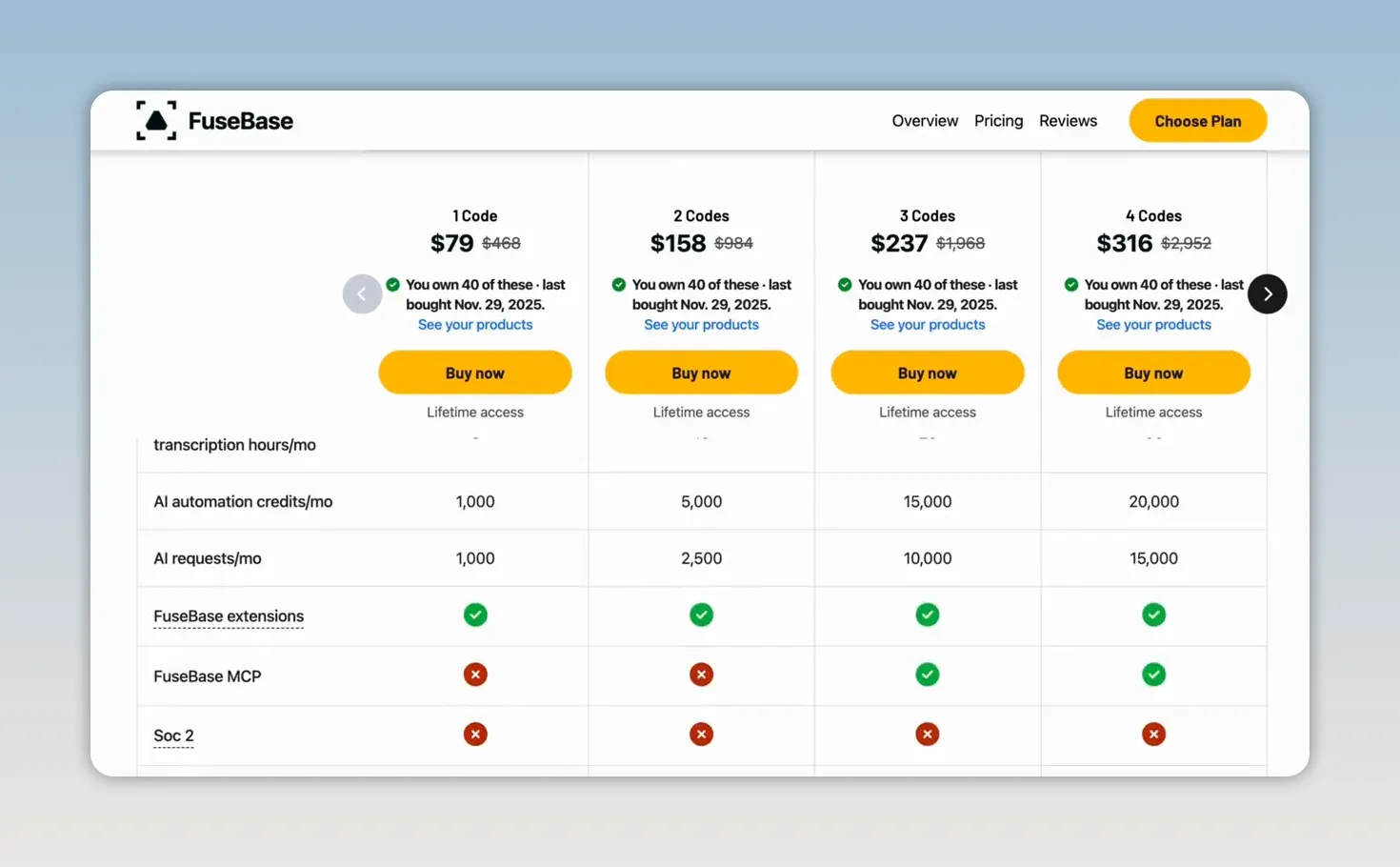
Also, useful does not have to mean daily or weekly. Some tools support work that happens less often. The point is that you have a real use for the capability, and the tier gives you enough access to complete that work.
Usage Costs: What Happens After the Included Allowance?
Many AI tools include monthly credits or minutes. After you use that allowance, you may need to buy a top-up or bring your own API key.
Under the Tough Tongue AI deal I purchased, Tier 4 included 1,000 minutes per month. Beyond that, there were options to top up or use our own key, with the latter offering a lower per-minute cost in that arrangement.
That can be perfectly reasonable. The important thing is knowing before you buy, rather than discovering it after you have built a workflow around the product. Deal allowances and pricing can change, so verify the terms of the offer you are considering.
Extra Subscriptions: What Else Must You Pay For?
Read the dependencies carefully. Does the workflow require other paid products? Are there agents that only work when connected to additional subscriptions? Are important add-ons billed monthly?
Part of why I refunded the add-on mentioned earlier was that I could not fully calculate its future credit costs and the cost of other paid tools some agents needed.
If a lifetime deal needs three monthly subscriptions to become useful, you are still paying monthly. Multiple times.
Ask Whether the Company's Economics Make Sense
The company also has ongoing expenses. Storage, backups, and AI usage do not stop costing money because a customer paid once.
A founder who had run a lifetime deal described that one-time sale as creating a future obligation the company still has to fund. So when a product promises unlimited access to something expensive to operate, ask how the team intends to sustain it.
We experienced a version of this with Easify. The company introduced subscriptions for access and features originally included in our arrangement, explaining that the original setup was unsustainable. We accepted a custom monthly subscription, but other problems eventually led us to cancel and delete our account.
A low entry price does not remove the need to understand the ongoing business model.
4. Will This Company Keep Showing Up for You?
A lifetime deal is often a relationship with a small team. That can be a real advantage. Some of my relationships with AppSumo founders and support teams have been better than my experiences with much larger, more familiar companies.
But you need evidence of how that team behaves, especially when things are difficult.
Sort Reviews by Newest
Older five-star reviews tell you what the product and customer experience were like then. They may not tell you what is happening now.
Read the newest reviews, particularly for products with a longer history. Then open the Questions tab. Look at whether founders respond, how quickly they respond, and whether their answers actually address the question.
Speed is useful. Substance matters too.
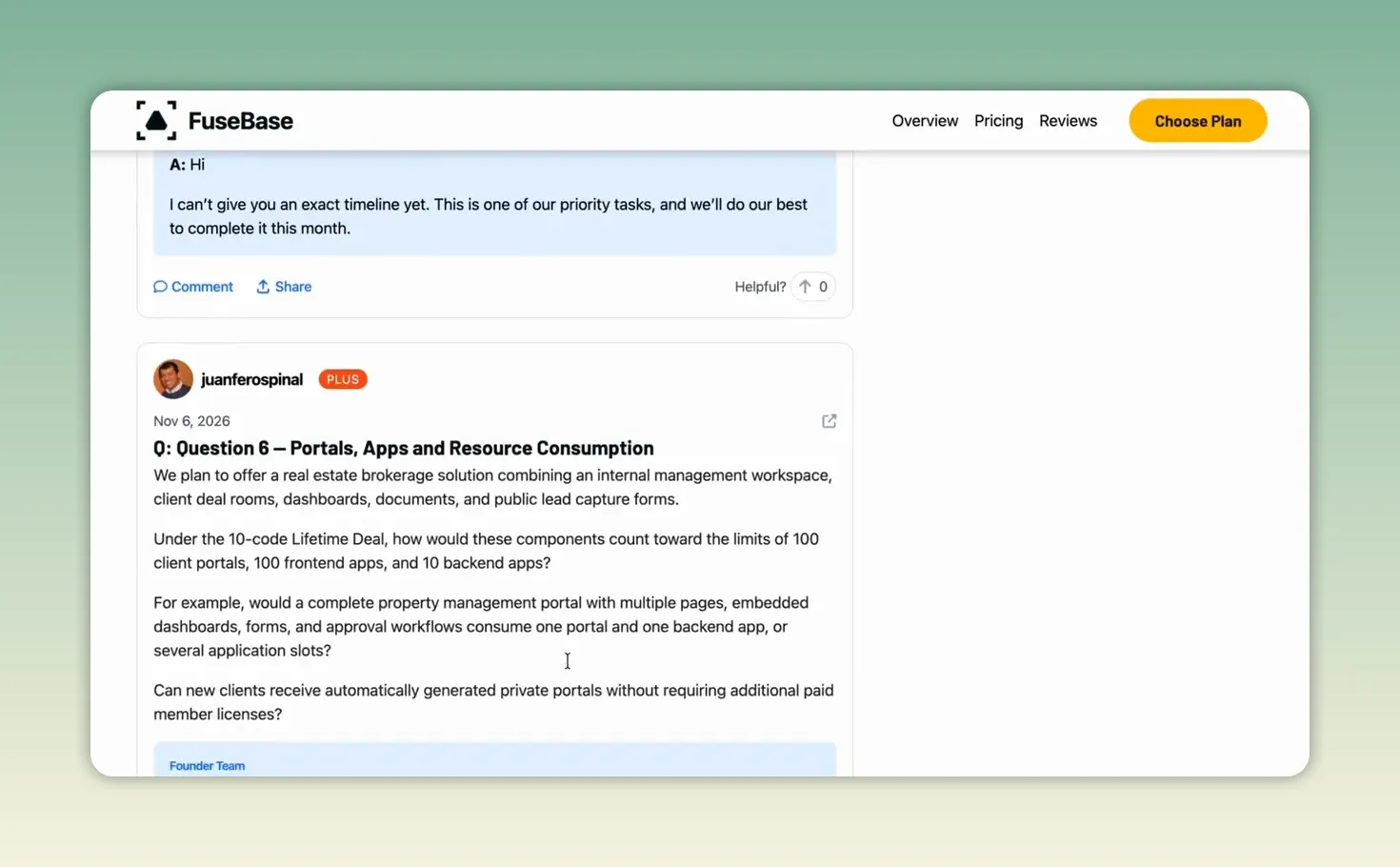
One reviewer walked away from a deal after a buyer raised a real problem and the founder replied with one word without addressing it. That interaction was information about the relationship a buyer could expect.
I pay attention to that. If a team is dismissive while people are considering a purchase, I am not comfortable assuming it will become more helpful when something breaks.
Compare the Roadmap With What Has Shipped
A roadmap is a statement of intent. Delivery is stronger evidence.
When Puzzle was previously on AppSumo, the team promised a way to track one-time purchases, and they delivered it. That gave me something concrete to assess.
SkillPlate presented a different situation for our needs. Its community functionality relied on a Discord integration, while native communities were on the roadmap. For the people we serve and the interactions we facilitate, we needed a focused, enclosed space. Discord was not the right fit.
Months passed, and by the June checkpoint I discussed, we were still waiting. Messages in the company's Discord indicated that native communities were not a priority at that time. That contributed to our decision to step back.
SkillPlate could still be a good product for someone who did not need that capability. But for us, that missing feature mattered.
Evaluate what is available against your needs, and use delivery history to assess promises.
Test Support During the Refund Window
I do not expect early-stage tools to be perfect. I do expect the team to follow up when a real problem occurs.
Grigora and Tough Tongue AI both responded quickly when I encountered problems. Tough Tongue AI resolved a phone setup issue in less than 24 hours. Later, a member of its engineering team spent about 30 minutes helping me understand and configure more advanced features, patiently answering my questions.
I have also had several helpful meetings with Pavle from FuseBase. Being able to reach someone who understands the product and takes your work seriously is part of trust.
The absence of all problems is not my standard. Responsive, useful support is a significant part of why a tool stays in my tech stack.
5. Does It Play Nicely With Your Other Tools?
A tool that cannot connect to anything can become one more place your team logs in to copy and paste information back and forth.
That is not necessarily making the work easier. It may simply be relocating the work.
For my workflows, I look for three kinds of connectivity, in this order: MCP, an API, and webhooks. That order reflects how much we use AI assistants and agents. What matters is whether the connection supports the work you intend to do.
MCP: Can My AI Assistants Work With It?
MCP stands for Model Context Protocol. In practical terms, it can give compatible AI assistants a way to interact with a tool and its information. The official MCP introduction provides additional background on the protocol.
I manage my blog on Grigora through an AI agent. We also use FuseBase's MCP capabilities to make unstructured information accessible in one place for our AI workflows.
That kind of access matters because the assistant needs to work with the systems where the information actually lives. Otherwise, we are back to manually moving things around.
An API: Can Other Software Read and Write Data?
An API allows software systems to interact. For this evaluation, the practical question is whether your other software can read information from the tool and write information to it.
An API can also provide a route for connecting an AI agent, although configuration may be required. Rybbit, our privacy-friendly website analytics tool, is one example in our stack with API access.
If the terminology is unfamiliar, MDN's API overview explains the basic concept. You do not need to become a developer to ask a founder which operations their API supports.
Webhooks: Can It Notify Another Tool When Something Happens?
Webhooks are my bare minimum for this kind of connected workflow. They let a tool push information to another system when an event occurs, such as a new signup or a completed recording.
They do not provide the same kind of interaction as a full API, but they can help information move without someone manually moving it between applications.
Check the Connection and the Tier
Integration deserves particular attention with less familiar AppSumo products. Connector services may support common tools such as Google Workspace and Airtable without supporting the smaller product you want to buy.
In my experience, relying on an additional connector can also introduce expense. Zapier's costs, including the MCP functionality I was evaluating, were a concern for my workflows. At the time, I was also still assessing Pabbly's developing MCP options.
The point is not to assume a connector will solve everything later. Understand the available route now.
Then check whether your tier includes it. Some products reserve API or MCP access for particular tiers. During my Subscribr evaluation, I was not certain whether Tier 3 included MCP access, so my advice was to ask the company before purchasing.
If the deal page is unclear, ask in the Questions tab. Their response helps answer two questions at once: can the tool connect, and will the company communicate clearly?
6. If the Company Disappears, Can You Leave With Your Stuff?
This question is personal for me.
Pxl.to, the link shortener we used, shut down. We moved to Switchy, but the lesson extended far beyond choosing a replacement:
Export your data regularly. Do not wait for a shutdown email.
That email may never come. Some products disappear without giving you a useful opportunity to retrieve what you built.
Before buying, check whether you can export your data in a format you can use elsewhere. The existence of an export feature is only helpful if the result lets you continue your work outside that platform.
And once the tool is in use, make exports part of your routine. Backup is not a task to begin only when you are worried about the company. It is part of organizational resilience.
Understand What AppSumo Protection Covers
Do not confuse purchase protection with protection for your work.
The terms I described for most deals included a 60-day refund window. I also discussed additional protection for eligible AppSumo Select products that shut down within 12 months: credits rather than cash, generally covering half the purchase price for most eligible buyers and the full amount for AppSumo Plus members.
Those are the terms to verify, not a blanket guarantee for every offer. Read the specific deal page and current policies before purchasing. Check the refund period, the Select badge where applicable, and the eligibility requirements.
Credits can help you purchase a replacement tool. They cannot recover the information, configurations, or work that disappeared with the original product.
That is why refund protection and data portability belong in the same evaluation, but they are not interchangeable. One may reduce the financial loss. The other helps you preserve your ability to keep working.
Use the Refund Window as a Real Test
If your deal includes 60 days to request a refund, treat those days as an evaluation period, not a place to store a future intention.
Put the software into the workflow you identified in question one. Give the intended user a chance to learn it. Test the relevant connections. Contact support when you encounter a real issue. Check the export.
By about day 45, you should have evidence of whether the tool belongs in your work.
My practical rule is that if it still is not part of your actual week by then, refund it. For tools used less frequently, the same principle applies: test the real task rather than keeping the license because you might need it someday.
A useful evaluation checks:
Workflow fit: Did it make the named task easier?
Capacity: Could the intended person learn and use it?
Cost: Are the limits and additional charges workable?
Reliability: Did support respond usefully when needed?
Connectivity: Does the required integration work on your tier?
Exit: Can you retrieve your information in a usable form?
You do not need to keep a product out of loyalty to the possibility it represented. The refund window exists so you can discover whether that possibility becomes useful work. Use it.
A Free Tool to Help You Evaluate AppSumo Deals
I built the free Before You Buy tool to walk through these six questions for an AppSumo deal.
You can choose up to three products from its list or paste up to three AppSumo links. It pulls together the information it can find and prepares a summary for each question, helping you compare the deals side by side.
The information about a product is only part of the decision, of course. You still bring the knowledge of your team's capacity, existing systems, and actual work. That is the part no deal page can determine for you.
| Evaluate Before You Buy Compare up to three AppSumo deals using the six-question framework with our free tool. Use the Free Tool |
The Right Purchase Strengthens Your Ability to Work
If you own software you never set up, you are not alone. I have made those purchases too. This is not about feeling bad about them. It is about making the next decision more intentionally.
The goal is not to build the biggest software collection. It is to choose tools with a clear purpose, enough capacity to put them to work, understandable costs, responsive teams, useful connections, and a way to leave without losing everything.
Technology alone does not create resilience. The right technology, chosen for the right purpose, can strengthen the systems that help us and our teams remain sustainable.
That is the decision worth making, whether there is a sale or not. With love, hope, and intentional action.

